
































Add Pinterest to your Facebook
As a Pinterest user, you probably already know that you can share pins on Facebook from your Pinterest account, or even Twitter, and if you are so inclined, all of your Pinterest activity can be syndicated to your social networks. Those are all great things, but that only helps for personal use and none of those efforts are fruitful for your Facebook Page if you are separating your professional efforts into a separate stream than your personal updates.
There is currently not native Pinterest tab, but there is a way to hack your way into sharing your Pinterest page with your Facebook Page followers without being a programming wizard – we’re going to walk you through this.
First, log into your Facebook account, then visit the Static iFrame Tab setup:

To get started, grant the app permission, then tell the app which page to place your tab from the drop down menu:

To access the settings for your new tab and to get one step closer to being Pinterest-ing on Facebook, look down at the sidebar of your page and click “Welcome,” which is the default name for the tab we will change momentarily:

Authorize the app (again, yes, it is redundant), which will take you to the settings. We suggest the following settings with one modification – set the height of the page to 1500 not 1200 so visitors will not have to scroll up and down. If you have additional rows of boards, add roughly 600 pixels per row. Most settings you see below are the default settings of the tab app, and give your tab a name (we went with PINTEREST-ing which is what the sidebar will now say instead of “Welcome”):

The final product
There are pros and cons to the final product, but take a look below before we share our notes:
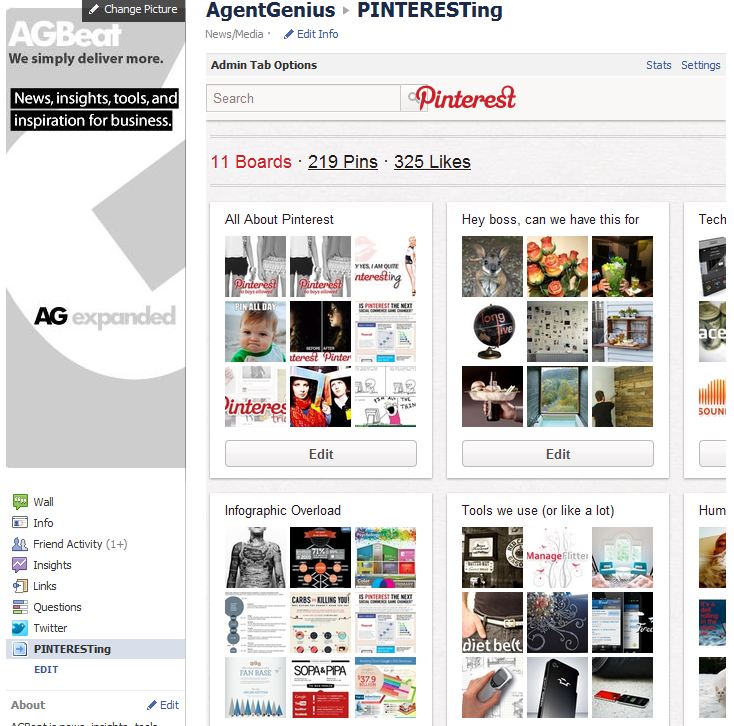
The first thing you’ll notice is that viewers have to scroll left and right to see your pins, but they can actually click on your pins and boards without leaving Facebook. Since Facebook altered their design, “tabs” are on the left side of the Facebook Page, so it will take a little effort to actually demonstrate to your page visitors that they can see your Pinterest page right there on Facebook – it is no longer a literal tab at the top of the page, so make sure to spell it out for page visitors.
If you want, the final setting option allows you to make this tab your default page for people who are not yet fans, but unless you’re going all in on Pinterest and it is more important than your blog, website or Facebook itself.
So there you have it, a fast and easy way to bring your Pinterest page to your Facebook page!
Update: an alternative, and more robust option now on the market is Woobox’s Pinterest tab.











Lynnette Walczak
February 13, 2012 at 7:08 pm
THANKS! Great tip. Appreciate your step-by-step instructions 😀 (…just wish you could adjust the width so visitors wouldn't have to scroll left & right)
Tonja
February 14, 2012 at 6:11 pm
You must think like http://www.studiotrainer.blogspot.com she shared this same idea several weeks ago..
It is a good idea!! Should be pretty fun to share your pins this way!
Pau
February 15, 2012 at 8:27 am
That's a great temporary idea, sure Pinterest will setup this functionality soon. I would like to add a tip:
Instead of using your regular url like " pinterest.com/losafiladores/ " use the Mobile url " m.pinterest.com/losafiladores/ "
Theresa
February 16, 2012 at 9:13 pm
Thanks so much for posting. I've neglected my Pinterest page, now I'll add it to my Facebook page – that will motivate me to make sure I work on it everyday!
@Paul Does using the Mobile url help eliminate the scrolling?
Abigail
February 17, 2012 at 10:05 am
Thanks! super easy and super handy! Will be sharing!
shannon olson
February 17, 2012 at 10:45 am
thank you!!!! great help
Melissa
February 17, 2012 at 9:55 pm
Thanks so much for sharing this. It is just the solution we were looking for. Keep the great ideas coming.
Dena
February 21, 2012 at 4:18 pm
Is it just me…but when I am logged into Pinterest and view the Pinterest tab on FB, anyone can go into and edit my account. Am I doing something wrong? Also how do I delete the tab from FB if I wanted to?
Thanks for the help.
Dena
February 24, 2012 at 2:29 pm
I hit the little x buy the welcome tab thinking that would delete it and I went to try and re-install the program but it is saying that it is already installed. But I can't find it…where would I find it? Thanks
Dena
February 24, 2012 at 2:44 pm
I figured it out…Go Me!!
La Vie en Rose
March 21, 2012 at 9:31 pm
Hi Lani, Thanks a million, just installed, works perfectly 🙂
Sharon
Lee
March 29, 2012 at 5:17 pm
Thanks for this tip! Will this need to be tweaked for the new Timeline format? My brand’s pages are already on Timeline, and the forced switch for everyone happens tomorrow.
christopher gaston
April 4, 2012 at 5:51 pm
I followed your instructions and now have the tab on my facebook page. However, when I tried to click on any of the link, I get an error stating the content cannot be displayed in a frame.
Have you encountered this? And is there any solution?
Thanks for the article.
–christopher
NearlyNormal
June 25, 2012 at 6:57 am
See my comment for much better apps to put Pinterest on your FB page.
ShashankTripathi
June 25, 2012 at 6:39 am
For Pages, there are plenty of options. How should I do this with my personal timeline?
NearlyNormal
June 25, 2012 at 6:48 am
For Pages, there are many options such as WooBox or Pinvolve. How do I get a similar tab on my own personal timeline?
roxanaramirez144
June 25, 2012 at 1:30 pm
e-mail zilchex@gmx.com ! I did it for a FB account! and it was fast and great!!
EtsyBagalicious
July 5, 2012 at 6:31 pm
I had this set up on my Bagalicious Facebook page, https://facebook.com/bagalicious but lately when I click on the tab I’m getting a big “Unauthorized” message. Has anyone else seen this? I’m considering deleting the tab and starting all over but I’m wondering if Pinterest or Facebook is now disallowing this for some reason.
EtsyBagalicious
July 5, 2012 at 6:39 pm
FYI, I did end up switching over to Pinvolve since I could not get the Static Iframe Tab to work again. (It was working when I set it up a few months ago but does not seem to work anymore and I’m not sure why.) Thanks to @NearlyNormal for the tip! ~Corinne
Elaine Griffin
July 16, 2012 at 10:32 am
Hi there, I published a similar tutorial several months ago, and now I and many others are getting the “unauthorized” message in our tab. Have you experienced this? I’m trying to find out what the deal is without switching to Woobox.