




























Boost productivity, reject distractions
If you’re the type of person who gets distracted easily, email notifications are the bane of your work existence. When you’re trying to finish a rush project due at the end of the day and an email pops up, it diverts your attention away from the task at hand and sets you farther behind. Email is a useful method of office communication, but there are times when you want to actually get work done as opposed to being bombarded with emails you’re copied on but don’t actually need to be. So how do you find a happy medium?
It’s obvious that you can’t simply do away with checking email because there are times when your input is needed in order for something to move forward. But if you’re heading home for the evening or going on vacation, you may want emails to be less of a priority. But how can you zen out when your desktop or phone screen is filled with email notifications? Google Chrome extension, Inbox Pause, lets users pause the receipt of emails during times that they want to relax, or if at work, block off time where they can focus on a project with no email interruptions.
How Pause Inbox works
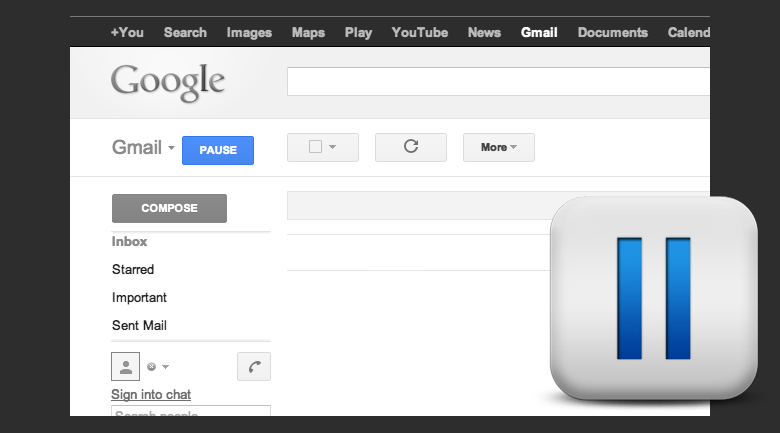
Once the extension is installed, a blue pause button appears in the toolbar. Users press the button and any emails received will move to a new label (for example September 12th Paused Emails). Once you’re ready to receive email again, click “unpause” and the emails you received during the break will move into your inbox.
Of course there are other ways to stop constant checking of emails, like minimizing the screen or turning off email notifications on your phone. But for those who still feel tempted to take a peak, Inbox Pause is a great option because it delays any emails coming into your inbox and holds them in a separate folder that users won’t be able to see until they unpause the extension. With no new emails to check, users can focus on work tasks or enjoy dinner with a loved without being distracted.
Having constant access to work conversation is ideal for staying up to date, but for the times when you need to drill down and focus, consider putting your emails on pause to add some uninterrupted time back into your day.
Bonus: Inbox Pause comes to you from the makers of Boomerang for Gmail, which most AGBeat team members actually use every day.










Tinu
September 11, 2012 at 9:42 pm
OMG pause all the things! There should be a pause for Every tool that feels it’s super important to tell you what has happened in the last nanosecond since you looked away.
justinw1631
October 10, 2012 at 10:51 pm
Google’s Gmail has also some useful tricks that can improve email productivity, if you have the time to discover it you may go to this blog (https://biz30.timedoctor.com/hidden-gmail-labs-feature-that-will- massively-boost-your-email-productivity/). I just learned it and will look forward to apply them in my work.